ID-ALL is a ID card software that allows you to design, print and/or encode your cards.
Your Evolis printer is supplied with a ID-ALL Starter license. See the ID-ALL product page to learn about the different ID-ALL editions.
For the license to be detected, make sure that you have a functioning internet connection on your computer.
It is advised to always have the latest version of ID-ALL installed on your computer.
- You have installed an Evolis printer.
- You want to use ID-ALL ID card software supplied with your printer to design, print and/or encode cards.
Installing ID-ALL
- Click here to download the latest version of ID-ALL (.exe for Windows and .pkg for macOS).
- Double click on the downloaded file to launch the installation wizard.
- Follow the on-screen instructions.
- You can choose to install ID-ALL (click Next) or to open it without installation to test the software for example (Click Evaluate).
Activating the license
If there is no license activated on the computer, ID-ALL runs in demonstration mode. Cards can be designed and printed but with a watermark on them.
You have a printer supplied with ID-ALL
For the automatic detection to work, ID-ALL version must be > 1.1.0.
Make sure the printer is connected to the computer before activating the license.
Thanks to the cardPresso server, the printer serial number is automatically detected and associated to an ID-ALL license.
- Once you have installed ID-ALL, the Account and license window is displayed.
- In the License information section, select your printer in the drop-down list.
- Click on Activate.
You have a printer that was supplied with cardPresso and you bought an ID-ALL license
- Once you have installed ID-ALL, the Account and license window is displayed.
- In the License information section, enter the activation code of your ID-ALL license.
- Click on Activate.
Verify that the license is correctly detected
Go to ID-ALL - License management to find information about your license.
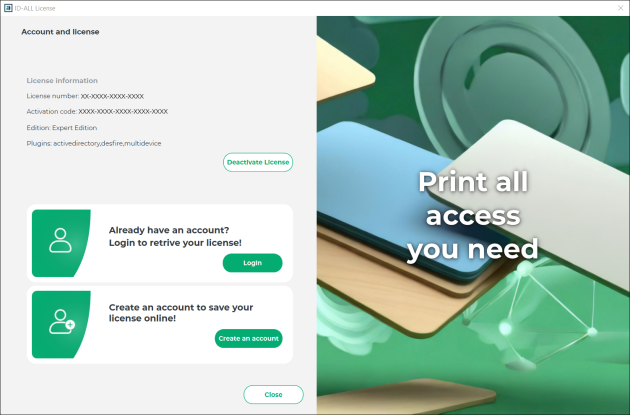
The first line gives you the license number.
The second line is the activation code (when an upgrade coupon is used).
The third line is the edition of the software.
If the license is not detected, Demonstration is indicated in place of the edition.
Was this article helpful?
That’s Great!
Thank you for your feedback
Sorry! We couldn't be helpful
Thank you for your feedback
Feedback sent
We appreciate your effort and will try to fix the article